Engineering · 2024
Operator Console for a Collaborative Robot Barista Cell
A touch desktop app that carries an order from intake through to robot extraction
An in-store console that merges kiosk orders and staff-entered orders into a single queue, drives a collaborative robot over Modbus TCP, and keeps extraction progress, consumables and alarms on one screen.
- Client
- Confidential client
- Category
- Engineering
Overview
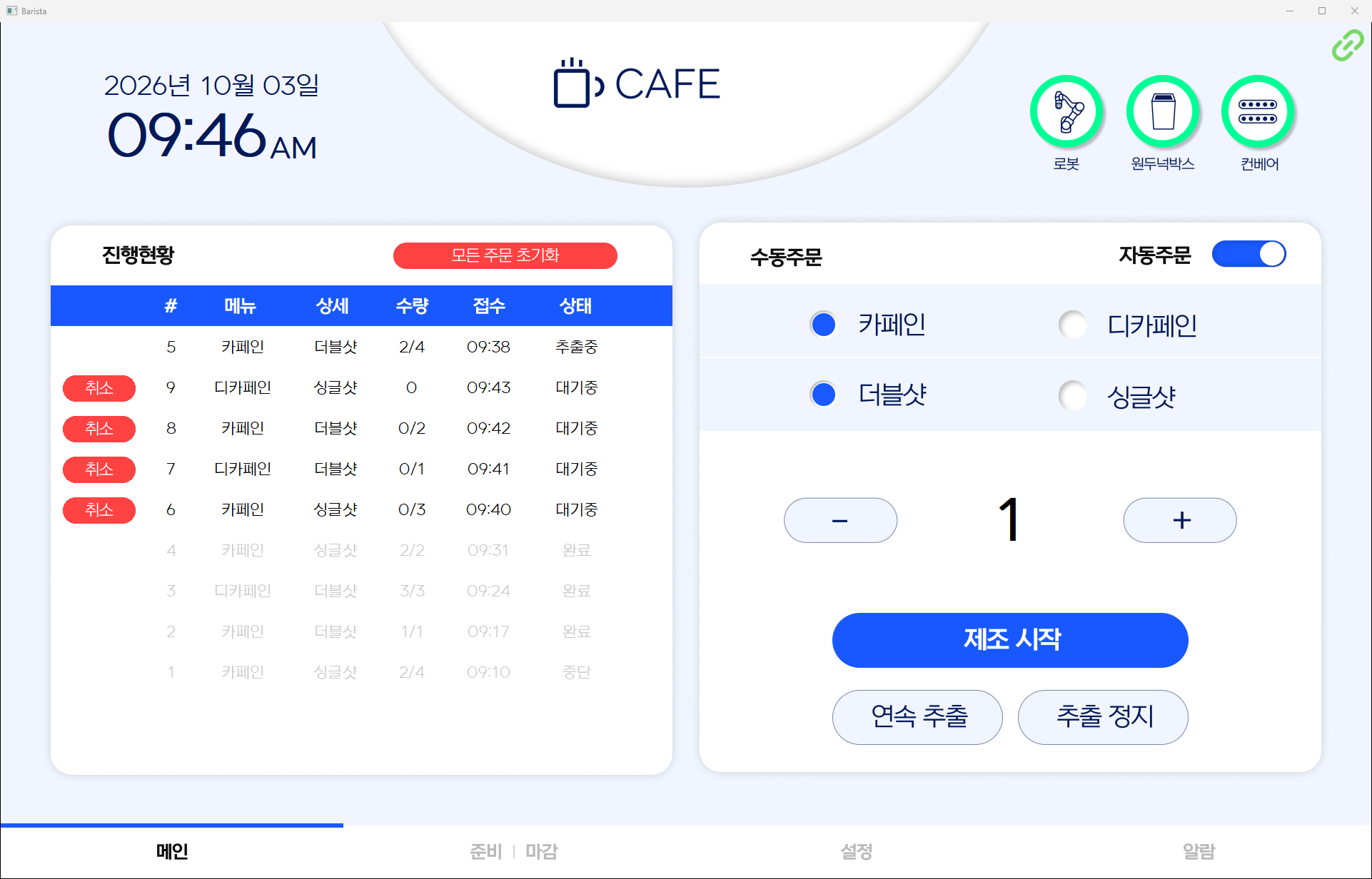
A Windows desktop application that runs on the operator PC of a collaborative robot cell that brews coffee. Staff work it from a touch monitor: taking orders, telling the robot what to extract, and checking equipment state all happen on the same screen.
The robot only speaks Modbus TCP registers. This application sits in between, turning an order a person would state as "two shots of caffeinated, four cups" into register values and a handshake sequence the robot understands. In the other direction it reads the status bits coming off the robot and the surrounding equipment and renders them as indicators and plain-language guidance.
Because the only input device is a touch monitor, the UI is built for a single 1920x1200 full-screen layout, with an on-screen keypad wherever a number has to be typed.
Challenge
Orders arrive on two paths. Those sent over the network by an external kiosk and those entered by staff on the screen had to end up in one queue.
Talking to the robot is not a single request and response. A menu code is written to the command register; once the robot echoes the same value back on a feedback register the command is cleared; when the work-complete signal goes up, a handshake register is exchanged until both sides return to zero, and only then can the next cup start. A break at any step in that sequence must not stall the queue.
If the application exits or the network drops mid-extraction, the robot is left holding its previous command. Unless that state is cleared on the next start, new orders never reach it.
Solution
The two intake paths were merged into one queue, and that queue is released to the robot in order as its state allows.
- The kiosk sends a three-digit order code over a TCP socket: caffeinated or not, single or double shot, and the number of cups
- Staff pick the same options on the main screen with radio buttons and a quantity stepper, or start a continuous run with no fixed quantity
- Kiosk integration is behind a single toggle, so external orders can be shut off during maintenance and the cell run manually
- A new order of the same type as the last waiting order is folded into it, accumulating up to 99 cups
- Only waiting orders can be cancelled, and a separate button clears every waiting order at once
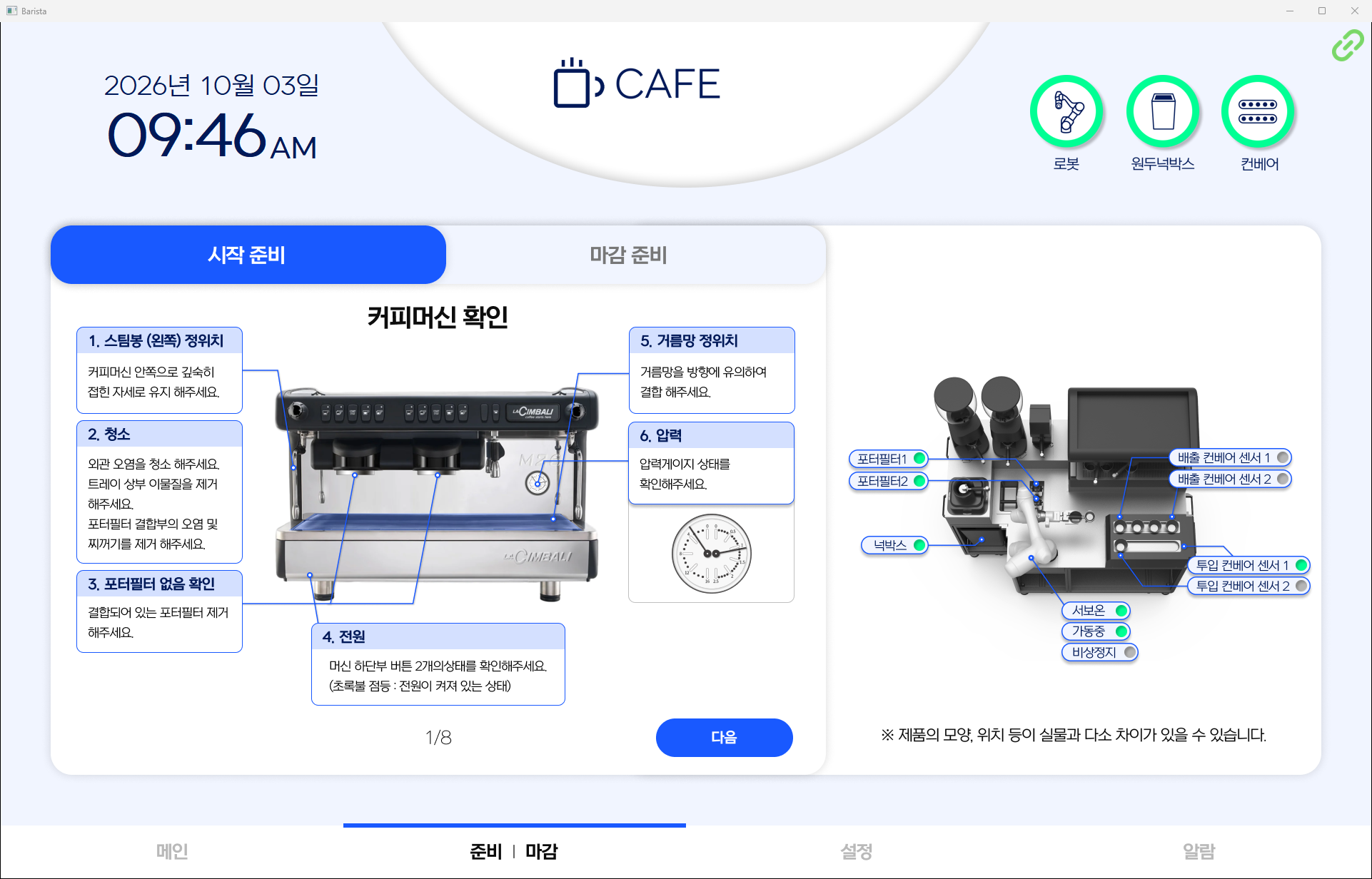
The daily opening and closing routines are on screen as well. Startup guidance is split across eight pages, from checking the espresso machine through to the gripper, while closing is a single button that sends the robot to its parked posture. The right half of the same screen carries live indicators for portafilter seating, the knock box, the infeed and outfeed conveyor sensors, servo power and emergency stop, so equipment state can be read while working through the guidance.
System architecture
Components
- A wxPython desktop app on the operator PC: a header, five body panels and a footer tab bar, each panel drawn directly over a background image
- A Modbus TCP client to the collaborative robot, polling coils and holding registers every 0.3 seconds and issuing commands as writes
- A TCP socket server for kiosks, spawning a receive thread per connected kiosk and discarding malformed orders to the log
- A SQLite database with three tables: configuration, orders and alarm log
Data flow
- An order from the kiosk socket or the main screen is given a six-digit order number and added to the queue and the database
- When the robot is connected and idle, the oldest waiting order is pulled and its menu code written to the command register
- Once the robot echoes that value back, the command is cleared and the shot-count feedback is read to update the order's progress
- On the work-complete signal, the handshake register is exchanged until both sides return to zero, the order is marked complete, and the next one starts
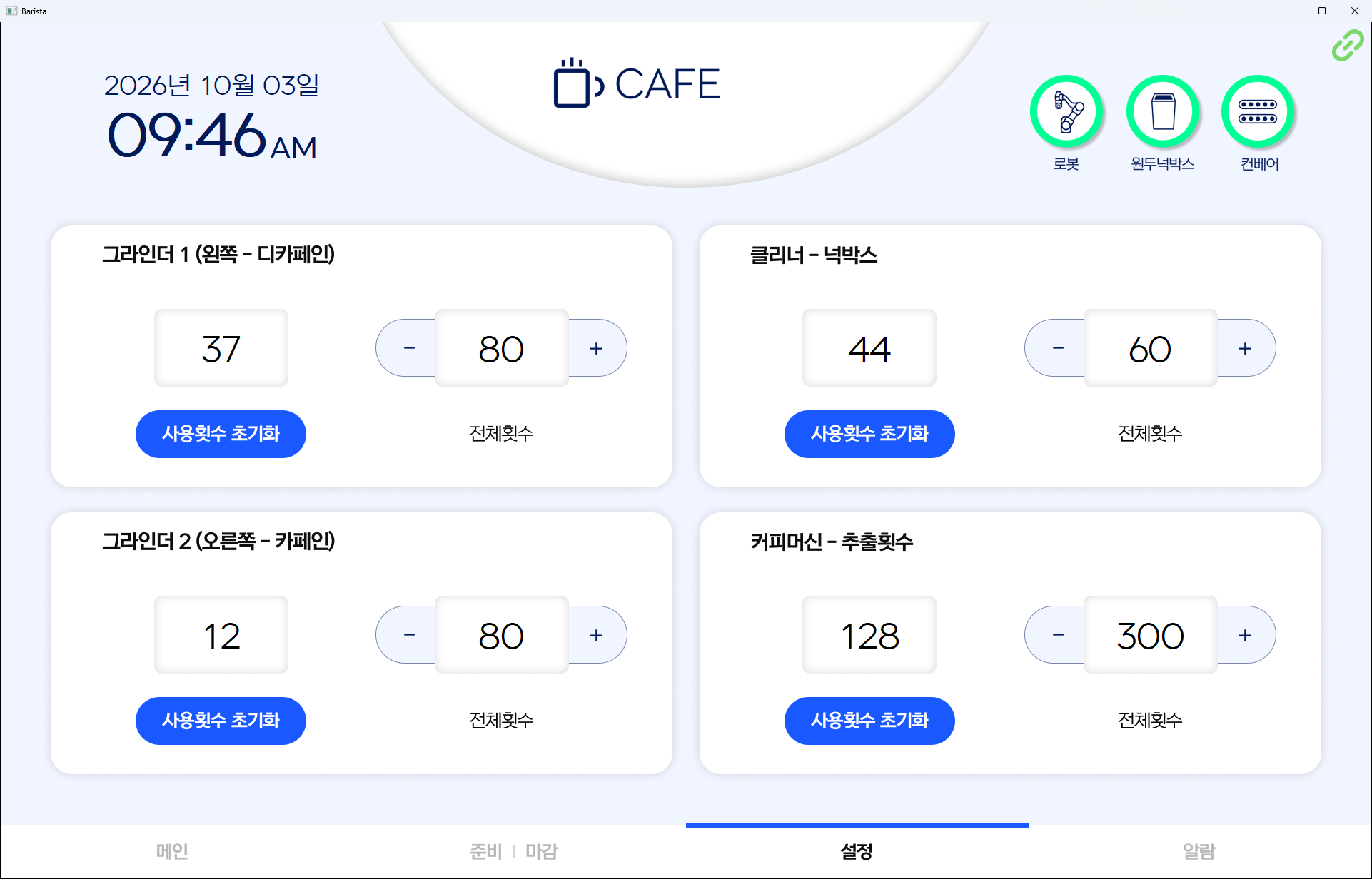
- Every time a cup begins extraction, the grinder, knock box and espresso machine counters advance, and a modal appears when a configured limit is reached
Implementation
Keeping communication off the UI thread
Robot communication runs on an asyncio event loop hosted in its own thread, leaving the wxPython main loop in sole charge of the UI, so a slow exchange never freezes the screen. Every screen update originating in the communication thread or a kiosk receive thread is marshalled back with wx.CallAfter.
Recovering from an interrupted sequence
On startup, as soon as the robot is reachable, the stop-feedback and work-complete feedback registers are read first. If the previous run left a handshake unfinished, that sequence is completed before any new order is accepted. A dropped connection is written to the alarm log and reconnection is retried against the same address; on reconnect, the settings stored on the robot are read back and reflected in the UI.
Translating error codes
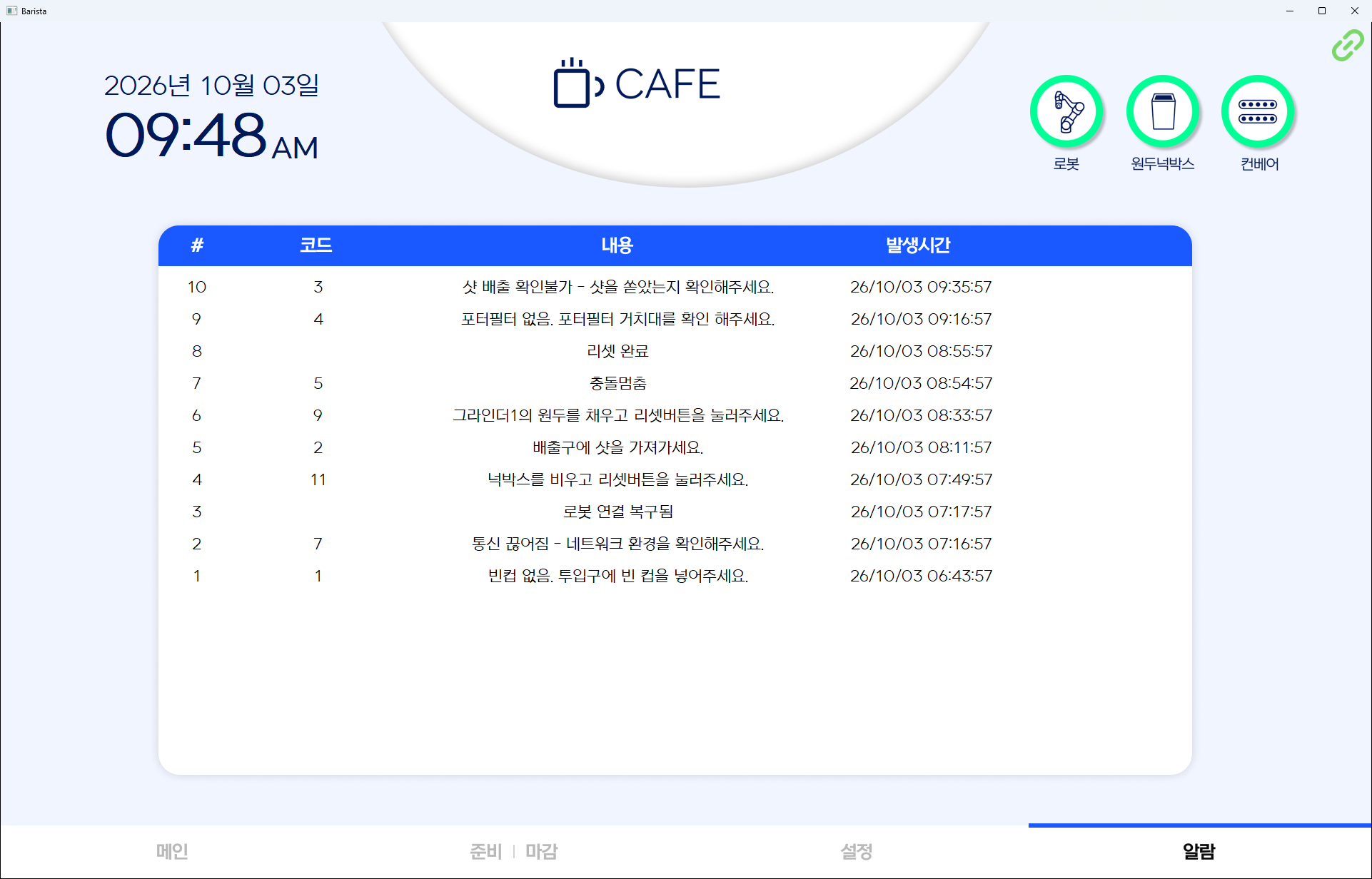
Error and status codes from the robot are mapped to plain Korean guidance such as "no empty cup, please load the infeed", "portafilter missing, check the holder", or "collision stop". When an error is raised, a modal explains what to do and stays up until the code clears. The same entries accumulate on the alarm screen with their timestamps, so a past fault can be traced back. Logs are retained for 100 days and the 50 most recent are shown.
An admin screen for commissioning
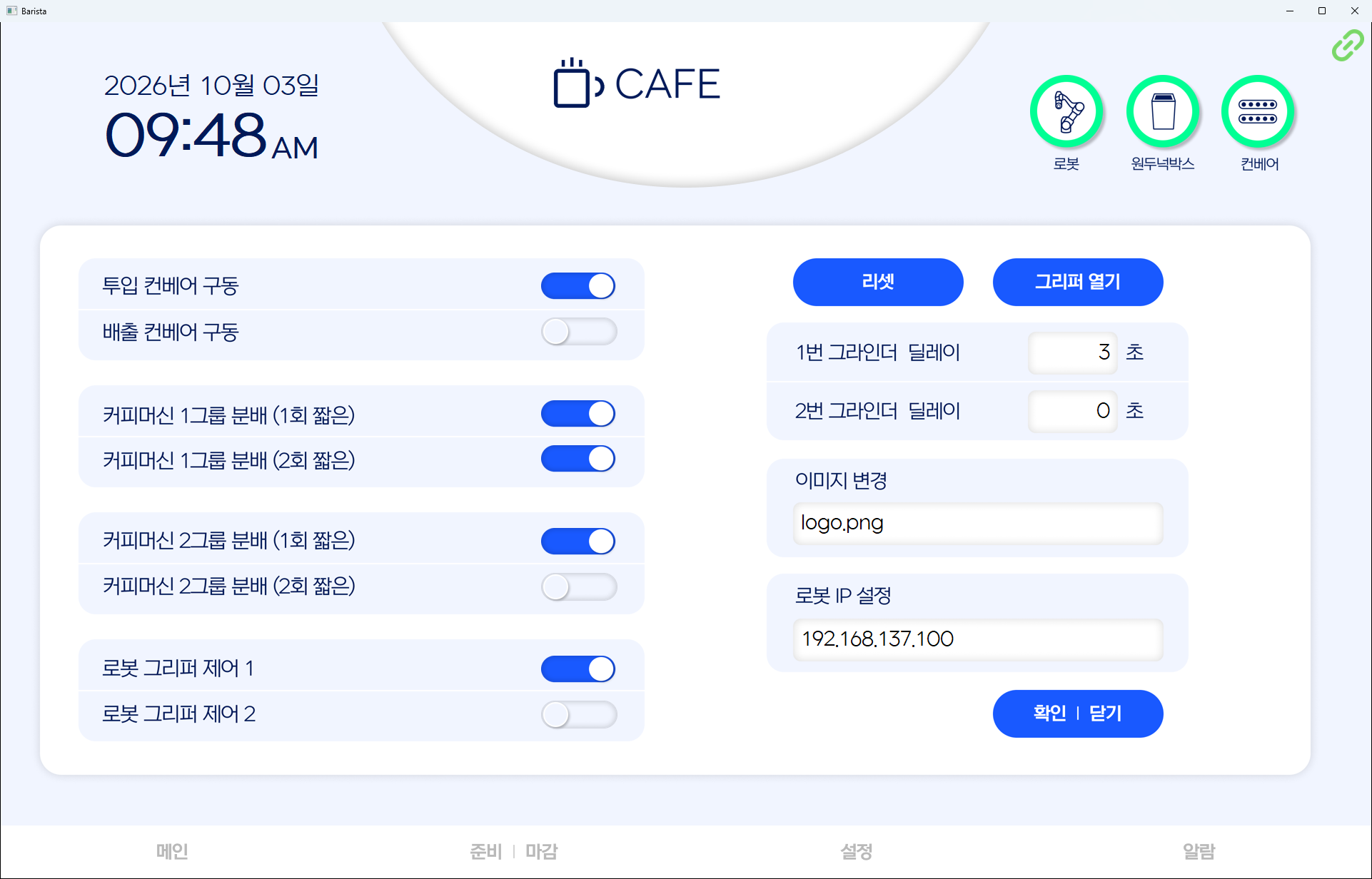
The controls needed during installation and servicing sit on a hidden admin screen. Conveyor infeed and outfeed, espresso machine group one and two dispensing, and the gripper can each be driven directly from a toggle to verify wiring and motion, and grinder dosing delay, robot IP and the header logo can all be changed on site. When the robot connects, the settings held on the robot are read back to populate the toggles and fields.
Shipping as source only
Background images, the Korean font and the notification sounds are all carried in the source as base64 strings. No resource files need to sit beside the installation, and the font is written to a temporary file at startup, registered, and deleted immediately.
Result
Staff can place orders, read equipment state and respond to faults from the on-screen wording alone, without knowing anything about the robot's registers or its link state.
Because kiosk orders and manual orders land in the same queue, the extraction order and progress of both paths can be followed in one place: which order is on which cup of how many, and which ones were stopped, all stay visible.
Grinder beans, the knock box and espresso machine use are counted per extraction and announced before the limit is reached, so staff do not have to track replacement timing themselves. Faults accumulate in the alarm log with their codes and timestamps, leaving something to work from when an equipment problem has to be investigated later.
Technology
- Python
- wxPython
- asyncio
- Modbus TCP
- pymodbus
- SQLite
Screens
Have a project in mind?
Tell me about the problem and where things stand, and we can work out the right approach together.
Discuss a project